• Skip to content
  • Skip to primary sidebar

Header Right

  • Home
  • About
  • Contact

admin

Don’t Wait Until December: Year-End Tax Actions You Should Take Now

November 20, 2021 by admin

Unless you’ve been planning for 2021 taxes all year, it’s time to take actions that can reduce your IRS obligation.

We’ve talked before about the importance of planning for taxes year-round. If you haven’t been able to do that because 2021 has been another complicated year, it’s not too late. There are things you can still do in November and December that will have impact on this year’s taxes.

It may be that taxes are not as big an issue for you because the COVID pandemic reduced your household income or your business sales, so you assume you’ll pay less in taxes. If so, you’re not alone. The Fidelity Investments 2021 Financial Resolutions Study found that two-thirds of Americans experienced a financial setback in 2020, for a variety of reasons, and 38 percent predicted that they’d be in survival mode in 2021.

Whether you’ve just been hanging on for the last ten months or 2021 was a good year for you, taking actions now that will affect your financial obligation that will come due next April should be high on your to-do list. Here are some suggestions.

Take advantage of Section 179.

No one likes dealing with depreciation. If you purchase or finance qualifying equipment or software in 2021, you may not have to. Section 179 in the IRS code allows you to write off the entire purchase price for the current tax year, up to $1,050,000. Though larger businesses may benefit from it, this tax legislation was specifically designed to help small businesses invest in themselves.

This doesn’t mean that you can only take the deduction if you buy equipment that costs less than $1,050,000. But the benefits start to diminish when you spend more than $2,620,000 total. The IRS also requires that you begin using the equipment—used or new—in 2021 to take the deduction.

Questions about whether you can take this deduction? Contact us.

Inventory your inventory.

Now is a good time to take a close look at your inventory. Are there products that are doing well? You might buy more before the year ends so you can claim a business expense. On the other hand, is there inventory that hasn’t sold and is unlikely to? If you have items that have lost their value, they can have impact on the balance sheet and income statement. Best to write them off.

This involves some complex calculations and knowledge of accounting rules. We can help you sort this out.

Consider putting off some income.

Are you due a bonus? You might consider putting that off until next year if your company allows it. Of course, you don’t yet know what your income and expenses will be for 2022. But at least you’ll be able to start including that as income at the beginning of the year and you’ll have plenty of time to make plans to offset it.

If you’re a freelancer or independent contractor and you know that your income will far outweigh your expenses in 2021, you might wait until the end of December to send out some invoices. That way, they won’t be included in 2021 income.

Look for more deductions.

It’s better to think about this now instead of during tax preparation, so you can assemble any documentation needed and have it handy. You already know about commonly-claimed deductions like hardware and software costs, internet and phone connections, and office rent and utilities. Are you considering your home office space, as long as it’s devoted to business use? Legal and professional fees? Bank fees and business interest? Advertising and promotions? Business insurance?

Then there are charitable contributions to qualifying organizations, which must be made by December 31, 2021, to be deductible for this tax year. Single filers who do not itemize can claim up to $300 in donations, while married couples filing jointly can take up to a $600 deduction. Individuals who do itemize can give up to 100 percent of their adjusted gross income (AGI) and claim it on their tax returns. C Corporations are limited to cash donations equaling up to 25 percent of taxable income.

Put more money in your retirement accounts.

This, of course, benefits you in two ways. Your retirement will be better funded the more you contribute to your 401(k)s, IRAs. etc. You’ll also benefit from a tax break by maxing out your contributions.

“Bunch” deductions.

When you bunch deductions, you claim as many deductions as you can in a given tax year so you can itemize. You take a standard deduction the next year, then continue to alternate between the two. This is often done with charitable donations that you make at the beginning and end of the year, but it can work with deductions like medical expenses and property taxes.

Use Our Services

You may have heard some of these suggestions before and either didn’t think they would help you or weren’t sure how to use then in your tax preparation. But your goal should be to pay as little tax as is legally possible. We can help you with this. If you want to have a conversation about any of the ideas mentioned here before the end of the year, contact us. We’ll also be available to consult with you and prepare your taxes next year. Let us know now if you’d like to do that so we can get you on the schedule.

SOCIAL MEDIA POSTS

There’s still time to take actions that will affect your 2021 taxes. We can help you minimize this year’s tax obligation.

Now is a good time to scrutinize your inventory. Which items haven’t sold well? You could write them off on your 2021 taxes.

If you expect to pay a lot in income taxes this year, maybe you could defer some income until 2022. Ask us about this.

Do you need to buy expensive capital equipment? Take advantage of Section 179 and deduct it all in 2021 instead of depreciating.

Filed Under: Business Tax

8 QuickBooks Online Tips

October 21, 2021 by admin

understanding-ratiosThere are always more things to learn about the applications we use every day. Here are some tips for expanding your use of QuickBooks Online.
We tend to fall into the same old patterns once we’ve learned how to make a computer application work for us. We learn the features we need and rarely venture beyond those unless we find we need the software or website to do more.

QuickBooks Online is no exception. It makes its capabilities known through an understandable system of menus and icons, labeled columns and fields, and links. But do we really see what else it can do? Expanding your knowledge about what QuickBooks Online can do may help you shave some time off your accounting tasks and better manage the forms, transactions, and reports that you work with every day. Here are some tips.

Edit lines in transactions. Have you ever been almost done with a transaction and realize you need to make some changes farther up in the list of line items? Don’t delete the transaction and start over. QuickBooks Online comes with simple editing tools, including:

  • Delete a line. Click the trash can icon to the right of the line.
  • Reorder lines. Click the icon to the left of the line, hold it, and guide it to the new position. This is tricky. You may have to work with it a bit.
  • Clear all lines and Add lines. Click the buttons below your line items, to the left.

qb tips

Click the More link at the bottom of a saved transaction to see what your options are.

Explore the More menu. Saved transactions in QuickBooks Online have a link at the bottom of the screen labeled More, as pictured above. Click it, and you can Copy the transaction or Void or Delete it. You can also view the Transaction journal, which displays the behind-the-scenes accounting work, and see an Audit history, which lists any actions taken on the transaction.

Create new tabs. Do you ever wish you could display more than one screen simultaneously so you can flip back and forth between them? You can. Right click on any link in QuickBooks Online, like Sales | Customers, and select Open link in new tab.

Use keyboard shortcuts. Not everyone is a fan of these, mostly because they can’t remember them. Hold down these three keys together to see a list: Ctrl+Alt+?. Some common ones include those for invoices (Ctrl+Alt+i) and for expenses (Ctrl+Alt+x).

Modify your sales forms. Do you need more flexibility than what’s offered in your sales forms? It may be there. Click the gear icon in the upper right and select Account and settings under Your Company. Click the Sales tab. In the section labeled Sales form content, notice that you can add fields for Shipping, Discounts, and Deposits by clicking on their on/off switches. You can also add Custom fields and Custom transaction numbers.

Add attachments. Sometimes it’s helpful to have a copy of a source document when you enter a transaction. To attach a receipt to an expense, for example, look in the lower left corner of the transaction. Click Attachments and browse your system folders to find the file, then double click on it.

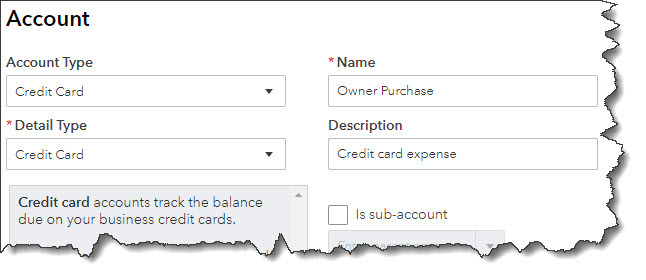
qb tips

Record expenses made with credit cards. Who doesn’t use credit cards for expenses sometimes? You can track these purchases in QuickBooks Online, as pictured above. Click the gear icon in the upper right and select Chart of Accounts under Your Company, then click New in the upper right. Select Credit Card from the drop-down list under Account Type. Enter Owner Purchase in the Name field and then Save and Close. When you create an expense, select Owner Purchase as the Payment account.

Previous Transaction Button. Are you trying to find a transaction that you entered recently but don’t want to do a full-on search? With a transaction of the same type open, click the clock icon in the top left corner. A list of Recent Expenses will drop down. Click on the one you want.

Whether you’re new to QuickBooks Online or you’ve been using it for years, there’s always more to explore. We’d be happy to help you expand your use of QuickBooks Online by introducing you to new features, building on what you’re already doing on the site to improve your overall financial management. Call us to schedule some time.

Our Albuquerque, NM offers QuickBooks consulting as part of our package of accounting services for small businesses. Call us at 505-200-0094 or request your complimentary consultation online now and find out how you can leverage QuickBooks to precisely track your finances.

Filed Under: QuickBooks Business Tips

5 Topics Every Business Owner Should Discuss with An Accountant

September 20, 2021 by admin

Handsome young businessman workingYour accountant or CPA is a business asset that you should put to good use year-round, not just at tax time. There are several topics beyond taxes that business owners should discuss with their trusted financial professionals. In this article, we cover five of them for you. While the new year is traditionally when business owners think of making financial, strategic, and other business-related plans, any time is the right time to speak to your accountant to discuss the following aspects of your business. You can’t begin the conversation too early, but it could be too late in some cases, so don’t put aside these five essential talking points.

1. Financial Planning

Budget is front of mind for business owners, but other financial issues impact your business, too. Consider a full portfolio review with your accountant to plan your financial future. Some critical topics to cover include strategies to improve cash flow, existing business loans, capital investment, charitable contributions, employee-related expenses like bonuses and health care, retirement planning, and asset management.

2. Company Growth

The goal of all businesses is growth. With growth comes change. As your business objectives shift, your valuation and tax liability often shift, too. Any changes you experience in your business should be conveyed to your accountant or CPA so that they can apprise you of liabilities or status changes. For example, suppose you plan to expand, add additional locations, make significant staffing changes, merge companies, acquire new businesses, or plan to sell your business. In that case, you should set up an appointment with your accountant to develop a logical strategy to address the change.

3. Inventory

If your business sells or resells tangible goods, inventory is vital. Sales tax laws and regulations can be challenging. Many states have rules about nexus (i.e., how much presence a business has in a city or state) related to where businesses warehouse inventory and fulfill orders. Your accountant can assess your order process to verify your restocking and ordering processes to maximize cash flow, ensure unsold inventory is accounted for, and ensure that sales tax is collected everywhere your company has nexus.

4. Risk Management

Do you have a plan in place to protect your business from disruption? Many do not. If that applies to your business, contact your accountant to discuss continuity planning to protect your business. They can provide professional insight regarding how to mitigate risks should a disruption occur. Some topics to address are whether your insurance policies are up to date, if all compliance, security, and privacy standards are met, whether your business has fraud protection in place, and if the existing internal controls protect your business. Given the time and capital small business owners invest in their passion, they must take time to manage any potential risk that could destroy what they worked so hard to create and build.

5. Tax Compliance

Lastly, as a business owner, you always want to be tax compliant. And this doesn’t apply only to federal taxes. It is just as essential to make sure state-imposed taxes are addressed on time. Regulations and tax laws change frequently, so it is vital to have a firm grasp on these. The best way to ensure you do this is to have your accountant guide you. They can inform you of any changes that affect your business and advise you on addressing them. Discuss collecting and filing W2s and 1099s for any contract employees; ensure exemption and resale certifications are collected and stored correctly; comply with online sales and nexus rules; and have an internal review to find any issues that might trigger a sale tax audit.


It helps to think of your business accountant as an extension of your team, an impartial adviser who will assess the risks and rewards associated with your business. They will answer your questions and illuminate unclear topics for you. They may bring up important points you’ve yet to consider, so make that call today and get a meeting on the calendar to discuss these critical points with your accountant. And remember, you can do your part by making sure you keep business and personal finances separate and maintaining complete, organized records.

Filed Under: Best Business Practices

Revisit and Review Your Last Tax Return

August 25, 2021 by admin

businessman workingCarrying out a post-tax season review of your income tax return can be very helpful way to gain new insight into your financial situation. It’s a bit like looking at a familiar place from a different and fresh perspective — you never know what you might discover. See what a review of your federal income tax return might reveal about the following issues.

Investments — Your Winners and Losers

Look for evidence of excessive gains and losses within a compressed time frame. If you are a trader, this might be typical. However, if you are an average investor, these gains or losses may point to the fact that you are buying and selling too frequently. You should consider the fees associated with excessive trading as well as whether your portfolio is structured in a way that meets your goals and your tolerance for risk.

You may have a capital loss carryforward that represents an unused loss you are carrying over to offset future capital gains. If you intend to rebalance* your taxable account investments, see if there will be capital gains that can be offset by the loss you are carrying forward.

Another possible way to reduce taxes is to consider municipal bonds. Interest on municipal bonds is generally exempt from federal income taxes and possibly state and local income taxes. Of course, the credit ratings of municipals should be analyzed before purchase. Although bonds with lower credit ratings may offer higher yields, they typically carry a higher risk of default.

Retirement Planning

You may be able to lower your current year’s income tax liability by increasing the amount you contribute to tax-favored retirement plans (limits apply). If you are taking distributions from a retirement plan still held with a former employer, you may want to consider a rollover into one account to consolidate accounts and simplify your recordkeeping. If you have multiple individual retirement accounts (IRAs), also think about consolidating accounts.

Your Business

If you operate a business, review of your tax return may point to a wealth of tax-saving and other planning opportunities. For example, if you are self-employed as a sole proprietor and filed a Schedule C, look into whether a different business form could make sense. For example, an S corporation can limit a business owner’s personal liability and may offer tax savings. If you do not already have a retirement plan in place, consider establishing one. A retirement plan established through your business allows you to save for your future financial security and deduct your contributions. Additionally, there may be income-shifting opportunities among family members through employment in the business.

Itemized Deductions

Review your Schedule A for potential opportunities. Is it possible to get a better rate and term on your mortgage loan? Would refinancing or switching to a 15-year term make financial sense? If you make charitable donations, look into contributing appreciated stock in place of cash. When you donate appreciated stock held more than one year, you receive a deduction for the value of the gift and you avoid paying capital gains tax on the appreciation.

You could also investigate establishing a charitable remainder trust. Doing so allows you to make a gift to charity, retain an income from the donated assets for life, and claim a current tax deduction for your gift.

Other Considerations

If your filing status has changed due to a life change such as marriage or divorce, make sure that change is reflected when you file this year’s tax return. In addition, be sure to keep your beneficiary designations on your retirement accounts and insurance policies current so that they accurately reflect your present status. If you have children, you may want to consider setting money aside for their future education. There are tax-advantaged college savings opportunities that you should look into further.

A review of your tax return and your investment transaction statements can help you identify areas where you may be able to lower the taxes you’ll have to pay next year. Your financial and tax professionals will be able to assist you in that effort.

*Rebalancing a portfolio may create a taxable event if done outside of a retirement account.

Discover how the right tax advisor can make all the difference in how much money stays in your pocket! Call us now at 505-200-0094 to learn more about our tax services for small businesses and individuals in the Albuquerque, NM area. You can also request your complimentary consultation through our website

Filed Under: Individual Tax

The Top 5 Ways Businesses Get in Trouble With the IRS

July 21, 2021 by admin

mid section view of a businessman using a calculator in an officeAs a small business owner, you probably know that willfully avoiding paying taxes will lead to severe problems with the IRS; however, IRS problems aren’t always a result of a business owner’s intentional actions. These are five ways business owners can get into trouble with the IRS that they might overlook or not realize.

1. Under-Reporting Income

All business income must be reported to the IRS. Even if you are a freelancer, receive contract payments, or are paid in cash, you must let the IRS know or risk hefty fines and penalties on top of the tax you owe on that income. Some individual self-employed people fail to pay taxes – either due to lack of knowledge about tax laws or evasion – and do not realize they are responsible for up to six years of back tax returns. Take note that if you do need to file back tax returns, many deductions are not claimable on more than the most recent three returns. Additional years, up to six, must be filed; however, the benefit of deductions is lost beyond three years.

2. Over-Reporting Expenses

Keep business expenses separate, preferably paid from a separate account and with a separate credit card, so that your expenses do not get mixed in with those for your business. The most common over-reported expenses are private travel being claimed and business travel and private miles driven and claimed as business miles. If you’re not sure what qualifies as an actual business expense, consult with your tax preparer or accountant. For a business expense to be deductible, it must be ordinary and necessary. An “ordinary” expense is common and accepted in your business; a “necessary” expense is helpful and appropriate for your business. Expenses like the cost of goods sold (for manufacturing businesses) and capital expenses (costs that are part of your investment in your business) are figured separately from business expenses.

3. Failing to Report “Trust Fund Taxes”

As an employer, you must withhold taxes from employee earnings. Those taxes are not paid to employees as wages and are held “in trust” until paid to the U.S. Treasury. Thus, the name “trust fund taxes.” These are income tax, Social Security, and Medicare taxes (aka “withholdings”). Sales tax is also considered a “trust fund” tax since it is collected from someone else like a customer or client and held until paid to the Treasury. These taxes must be paid and reported to the proper taxing authority and cannot be used for operating or financing a business. If they are, and they are not reported, it is considered tax fraud.

4. Forgetting the Self-Employment Tax

Just like an employer must withhold Social Security and Medicare taxes from employees, if you are self-employed, you must pay self-employment (SE) tax, consisting of Social Security and Medicare taxes, to the Treasury. The SE tax is 15.3 percent (12.4 percent for social security (old-age, survivors, and disability insurance) and 2.9 percent for Medicare (hospital insurance) of net self-employment income in addition to income taxes. That means it is calculated after expenses are deducted. Note that SE tax does not include any other taxes that self-employed individuals may be required to file, so these individuals must consult their tax preparer or accountant to be sure they are paying all the required taxes. Also, self-employed individuals can deduct the employer-equivalent portion of the SE tax when calculating their adjusted gross income (AGI). Also, keep in mind that the tax is paid only on net self-employment earnings, that is, income after expenses are deducted.

5. Not Paying Estimated Quarterly Taxes

As a small business owner, you do not have taxes withheld from a formal paycheck as wage-earning employees do. However, that does not mean there are no taxes due to the IRS. If a small business owner anticipates a tax liability of $1,000 or more, they must send estimated quarterly tax payments to the IRS. Not doing so can lead to a whopping end-of-year tax bill with penalties, too.


Again, as mentioned above, consult your tax preparer or trusted accountant to help you make sure you stay in the clear with the IRS.

Our Albuquerque, NM CPA firm provides accounting services  for all types of small businesses. Call us at 505-200-0094 now and tell us about your business or request a complimentary consultation online.

Filed Under: Business Tax

Resolve to Do These 3 Things in QuickBooks Online This Month

June 29, 2021 by admin

Casual man working on laptopBy now, many New Year’s resolutions have already been made – and broken. Though they’re usually created with the best of intentions, they’re often just too ambitious to be realistic.

For example, you might decide to learn more about QuickBooks Online and keep up with your accounting chores more conscientiously in 2019. That’s hard to quantify. How will you know if you achieved that goal?

Instead, why not pick three (or more) specific areas and focus on them this month? We’ll get the ball rolling for you by making some suggestions.

Explore the QuickBooks Online mobile app:

Yes, QuickBooks Online itself is already mobile; you can access it from any computer that has an internet connection and browser. But you probably don’t always lug a laptop around when you’re away from the office, and you’re sometimes at locations where using it wouldn’t be practical. But you can always pull out your smartphone and fire up the QuickBooks online app, available for both iOS and Android.


No matter how small your smartphone (this image was captured on an iPhone SE), you can still do your accounting tasks using QuickBooks Online’s app.

QuickBooks Online’s app replicates a surprising percentage of the features found on the browser-based version. You can create, view, and edit invoices, estimates, and sales receipts for example, as well as see abbreviated customer and vendor records. Your product and service records are available there, including tools for recording expenses on the road.

Create a budget for one month:

Budgets are intimidating. That’s one reason why some small businesses don’t create them. So instead of trying to estimate what your income and expenses will be for an entire fiscal year, just build a budget for one month. In QuickBooks Online, you’d click the gear icon in the upper right, then select Budgeting. Click Add budget in the upper right to open the New Budget window.

Give it a name, like “February Budget,” and select FY2019. Leave the Interval at Monthly, and open the Pre-fill data? menu to click on Actual data – 2018 (if you have data from last year). Then click Create Budget in the lower right corner. Look at last year’s February numbers and estimate how they might change in 2019. Replace the old numbers with your new ones.

Creating a framework for a budget in QuickBooks Online is easy.

We’re suggesting you try it for just one month, so you get a feel for how this tool works. And that experiment will probably leave you with some questions. We can help you go further and complete an annual budget.

Customize your sales forms:

Every piece of paper and email you send to your customers contributes to their impression of you. Are you presenting an attractive, consistent image of your business to them? QuickBooks Online can help with this. It offers simple (for the most part) tools that allow you to modify the boilerplate forms offered on the site – without being an experienced graphic designer.

Start by clicking on the gear icon in the upper right and selecting Your Company | Custom Form Styles. Unless you’ve done some work in this area before, the screen that opens will have just one listed entry: your Master form, the one that comes standard in QuickBooks Online. To see what you can do, click Edit at the end of that line. Your four options are:

  • Design. This section contains links to modifications you can make to your sales forms’ visuals. You can, for example, add a logo or color and change the default fonts.

Want to change your logo or other elements of your sales forms? QuickBooks Online has the tools.

  • Content. Do you want to add or remove the standard columns (Date, Quantity, etc.) displayed on your invoices? You can do so by checking and unchecking boxes.
  • Emails. QuickBooks Online sends email messages with forms; you can edit them here.
  • Payments. This is a reminder that QuickBooks Online supports online payments, which can help you get paid faster.

There’s more you can do to make your sales forms look professional and polished. We can help you with these tools – and any others you want to explore to expand your use of QuickBooks Online. It’s a new year, and who knows what might come your way over the next 12 months? Contact us if you want to prepare for the new accounting challenges that 2019 might present.

Filed Under: QuickBooks Business Tips

  • « Previous Page
  • Page 1
  • …
  • Page 7
  • Page 8
  • Page 9
  • Page 10
  • Page 11
  • Page 12
  • Next Page »

Primary Sidebar

Search

Archives

  • January 2026
  • December 2025
  • November 2025
  • October 2025
  • September 2025
  • August 2025
  • July 2025
  • June 2025
  • May 2025
  • April 2025
  • March 2025
  • February 2025
  • January 2025
  • December 2024
  • November 2024
  • October 2024
  • September 2024
  • August 2024
  • July 2024
  • June 2024
  • May 2024
  • April 2024
  • March 2024
  • February 2024
  • January 2024
  • December 2023
  • November 2023
  • October 2023
  • September 2023
  • August 2023
  • July 2023
  • June 2023
  • March 2023
  • February 2023
  • January 2023
  • December 2022
  • November 2022
  • October 2022
  • September 2022
  • August 2022
  • July 2022
  • June 2022
  • May 2022
  • April 2022
  • March 2022
  • February 2022
  • January 2022
  • December 2021
  • November 2021
  • October 2021
  • September 2021
  • August 2021
  • July 2021
  • June 2021
  • May 2021
  • April 2021
  • March 2021
  • February 2021
  • January 2021
  • December 2020
  • November 2020
  • October 2020
  • September 2020
  • August 2020
  • July 2020
  • June 2020
  • May 2020
  • April 2020
  • March 2020
  • February 2020

Categories

  • Best Business Practices
  • Business Tax
  • Estate and Trusts
  • Individual Tax
  • Investments
  • QuickBooks Business Tips
  • Real Estate
  • Retirement

Copyright © 2021 · https://www.allbusinesscpa.com/blog